 |
PFClean Documentation | Licensing |
Licensing Overview
Enterprise licenses are managed by the PFBucket License Server, and once activated on your server they can be used by any machine that can connect to your server over your local area network.
Installing PFBucket
Documentation describing how to install and configure the PFBucket License Server is available in the PFAccount Portal and is also included in the PFBucket License Server software installer. You can find instructions on how to configure networking, place your entitlements in a bucket, and how to activate your licenses on the server.
Unlicensed Mode
The first time you run PFClean after installation it will launch in unlicensed mode. Unlicensed mode allows you to use PFClean without a license with certain restrictions (for example, exports are not available and projects cannot be loaded or saved). This requires an internet connection to The Pixel Farm's servers.
Once PFClean has launched in unlicensed mode, you can connect directly to your PFBucket server and request a license to unlock the full application functionality.
Subsequent application launches will connect immediately to your PFBucket server and will not run in unlicensed mode.
If you do not have have internet connection and therefore cannot connect to The Pixel Farm's servers to launch in unlicensed mode, you can use an environment variable to connect directly to your PFBucket server as described here.
Connecting to PFBucket
After launching the application in unlicensed mode, click the preferences button  at the top-left of the PFClean window, and then click the PFBucket icon:
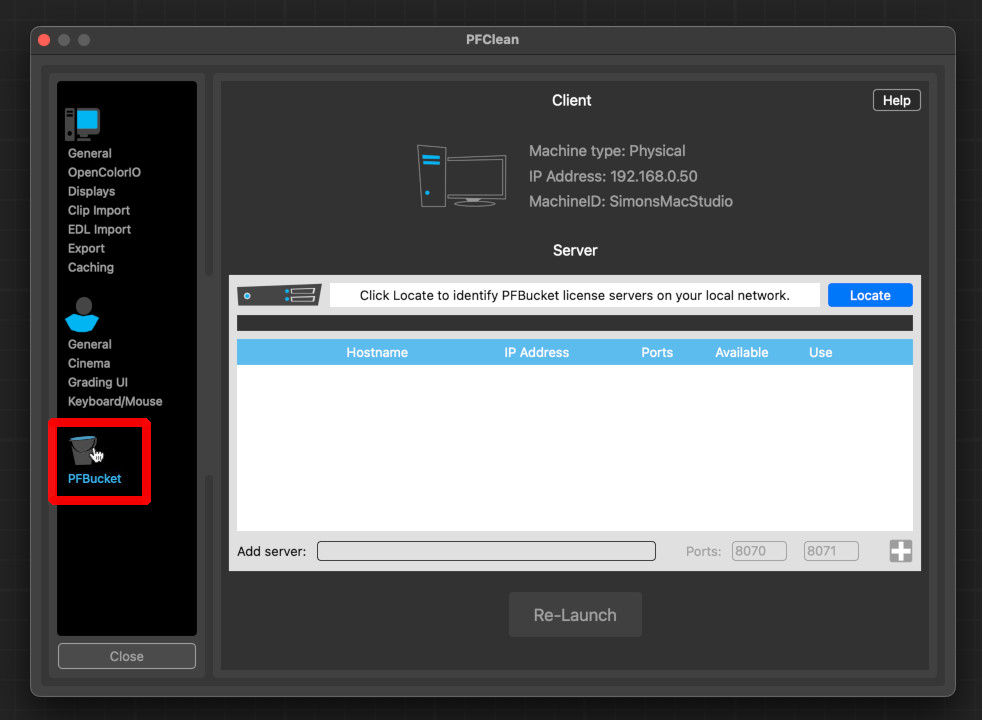
The PFBucket window contains information about your workstation, including the machine type (Physical or Virtual), your IP address, and your machine name.