 |
PFClean Documentation | Licensing |
Troubleshooting
If a connection to your PFBucket server cannot be made, you can hover the mouse over the Available column in the server list to see any error messages. This may include information about connection problems on your network, or whether your licenses have expired:
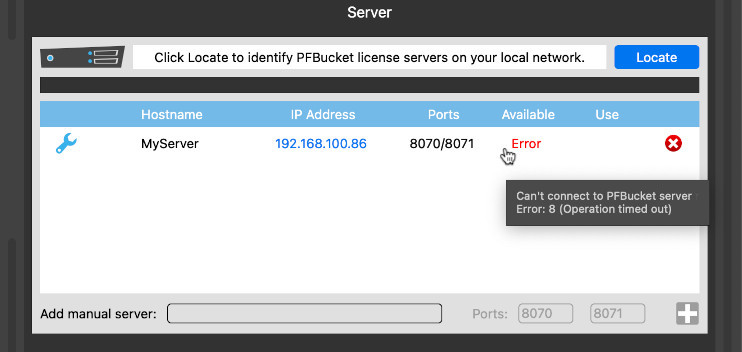
If you are unable to connect to your PFBucket server, please check the IP address and ports number for your server, and make sure the PFBucket license server is running correctly.
You can quickly check your server status by clicking on IP address. This will open the PFBucket license information page in an external web browser.
Further information about configuring the PFBucket license server is available in the PFAccount Portal at https://pfaccount.thepixelfarm.co.uk and in the PFBucket software installer.
Network connection to the license server has been lost
If this message appears when running PFClean on your workstation after successfully connecting to your PFBucket server, it means that connection to the server has been lost, potentially due to a configuration change of your network whilst the application was running.
To ensure a stable connection, make sure the IP address and configuration of your server remains fixed whilst running PFClean.